

Virtual reality home design tools allow you to stroll through your potential kitchen or porch before a single 2×4 is chopped. You throw on a headset in your LA apartment and shift walls, swap counters, or insert a 12-foot island as the sun sets over the Santa Monica grid.
These apps read real city lot lines and pull local Lowe’s stock, so the prices and footprint match code. Up next: how the gear works and what it costs.
Why Use VR for Home Design?
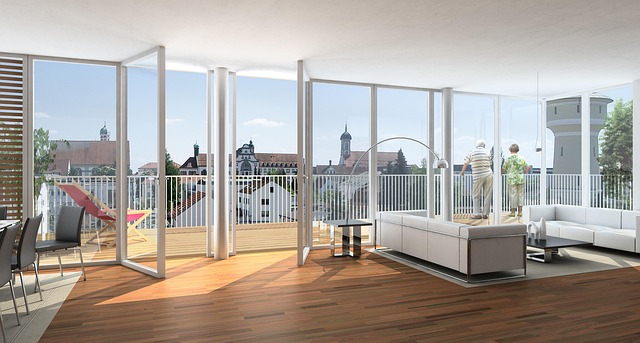
VR transforms a floor plan into a walk-through house before a wall is constructed, utilizing advanced virtual reality software. It trades marble for wood in a click, pulls the sun across the sky to display actual light, and helps visualize a bad sofa size before you drop two grand on it. One headset session is less than a chair and saves an entire room design redo.
1. True-to-Scale Feel
Stand at eye-level with the virtual kitchen island and you’ll immediately find out if the bar overhang jabs your hip. No tape measure can contend with your own body. You reach up inside the headset and the ceiling feels near enough to whack your knuckles, so you notice the pendant lights would dangle in your mug.
Pace the layout, count steps. If that touted 200 square foot master closet only swallows eight, the numbers are wrong. Drag the real sofa size into the model. When the sectional bumps the VR doorway, you downsize before delivery crews ever arrive.
2. Material Testing
One click swaps oak, walnut, and bamboo on the same floor. Turn the view and see grain sizzle or fade under a California noon. Three wall paints—matte, satin, gloss—all going up, side by side.
Twist the camera and glare pops out. Countertops go in and out of style from Carrara to quartz to butcher-block. Crumbs are color-matched so that you see what hides the mess. In the shower scene, roughness maps transform glossy tiles into skid hazards as water flows.
3. Light Simulation
Pull on a slider and sunrise slinks across the living room. Drop a chair where the beam hits and you’ve landed the reading spot without having moved furniture even once. Switch bulbs from 2700 K warm to 5000 K cool.
There are no more hardware store runs. Night mode dims paths so you place step lights before you stub a toe. Skylight blinds come down for cloud-covered Tulsa days and expose pot lights that are absent.
4. Weather Preparedness
Import local weather data and see winter sun bake the south windows. Tweak overhang depth until heat gain falls. Snow piles on the virtual reality roof, indicating whether or not your gutters sit too low.
A thunderstorm preset throws shadowy skies across the desk. Monitor glare informs you to trade glossy paint. Wind arrows blow across the porch so you put in a glass panel before the Oklahoma gusts destroy lunch.
5. Cost Savings
See a sofa overlap, remove it and order a smaller one with no restocking charge. Demolish a wall in headset; if the beam holds, forget the architect’s prints.
Switch out custom cabinets for ready-mades in-app and see the budget bar shrink. Export the precise tile count so you purchase only what the list specifies and bypass the return pile.
Choosing Your VR Design Tool
Select a virtual reality application that suits your equipment and your team.
Key Features
Real-time lighting can make or break the vibe of a room. Dabble with a drag of the sun slider and see shadows crawl across a California deck. Flip bulb temp from cool 4000 K to warm 2700 K and watch pine floors turn honey gold.
Export matters: OBJ and FBX let any builder in L.A. Pop your model into SketchUp or AutoCAD without a fight. Cloud save means the very same file is right there on the office iMac, living-room iPad, and the Quest you fling from your carry-on.
|
Tool |
Price |
Pros |
Cons |
|---|---|---|---|
|
Live Home 3D Pro |
$50 one-time |
Exports 3D plans, Apple Vision ready |
Mac/iOS only |
|
Homestyler |
Free-$29/mo |
Contractor PDFs, big library |
Needs steady net |
|
Planner 5D |
Free-$20/mo |
VR walk-through on Quest |
Watermark on free tier |
|
Sweet Home 3D |
Free |
Open source, light files |
Dated UI |
Hardware Needs
A Quest 3 ($500) and a pair of touch controllers is the most affordable path to snag chairs and toss them across a room. Your Windows tower requires a minimum NVIDIA GTX 1070 at 90fps. Any less and the frame drop will upset your stomach.
Spinning trumps teleporting any day. A cheap whizzy chair soothes tummies! Keep a 25 ft tape measure in your back pocket and punch in true wall lengths before you build so the sofa really fits when it ships.
Platform Integration
- Export 2D PDFs for contractors who continue rolling prints on truck dashboards.
- Handy sync to Google Drive or OneDrive so every tweak auto-saves and you never lose three hours of trim work.
- Search for Apple Vision Pro builds if you bounce between downtown MacBook and iPhone in situ.
- Search for lively communities. A noisy mob codes plugins that replace IKEA brochures in the app within minutes.
Active community means quick replies. Reddit threads packed with custom Homestyler window styles spared a Silver Lake flip six hours of tinkering. Updates count as well.
Planner 5D sent a lighting fix last month that halved render times. Test free tiers first: drag a couch, flip a light, and export the file. If the scale seems wrong, scrap it and continue.
Streamline forms and scale down images prior to posting. Tiny files stream right up and make teams grin.
Your First VR Design Project
Open Live Home 3D, tap “New,” and punch in your room’s real numbers: 12 feet 5 inches long, 10 feet 3 inches wide, 8 feet ceiling. The grid jumps up. Drag a wall block, snap its corner to the next, type “bedroom” so the label floats overhead later. Open the library, snag a queen bed and six-drawer dresser, place them on the plan, then drag the corners until the walk strip along the foot of the bed hugs 36 inches.
Tap that tiny goggles icon, put on the Quest 3, and walk through the room before you pay real cash.
Measure Space
Measure twice: once at the baseboard and once at the ceiling line. Old LA apartments often taper an inch and the headset will feel it if you skip this. Remember the sill height of 28 inches and glass width of 36 inches so the app can cast morning sun onto the duvet.
Mark the location of the outlet behind the nightstand and the direction of the floor vent to blow. Blocking either of which in VR saves you from moving a 70-pound bed later. Snap four phone pics, one from each corner, and pin them as ghost planes inside the model so you never guess where the closet lip ends.
Build Layout
Begin with a flat rectangle floor, then extrude each wall according to your notes. Select a solid-core door from the catalog, swing-in, left. See if it clips the hallway shoe rack.
Assume all walls are 4 ½ inches thick so baseboards and ethernet jacks sit right. Wrap the entire case so a rogue thumb swipe won’t push a wall when you lay down rugs.
Furnish Rooms
Filter to ‘mid-century’, drop in the 96-inch sofa first, then slide the coffee table precisely 18 inches. Change the accent chair fabric from mustard to teal and see how it pops in west-facing sun.
Save that as v1 so you can roll back after you try a sectional that devours half the room.
Walk Through
Take the controllers, choose first-person, measure every path with outstretched arms. If your knuckles skim virtual drywall, book a slimmer buffet. Squat down to toddler eye level, which is 32 inches, and see if kitchen outlets remain covered.
Capture a 360 clip so Grandma on her iPad can veto the glass dining table sans goggles.
VR for Oklahoma-Specific Designs
Oklahoma’s wind rose is not some abstract chart within a headset. Import the state’s spring data and you see gusts that whip from the south at 25 mph, then hook northeast. In VR you stand on the designed patio and watch rain fly nearly sideways, with the device spraying streaks on the glass and indicating where water will slip past a typical 2-inch sill.
VR for OKC-Specific Designs like the Tulsa couple who swapped a full slider for a hinged out-swing door after the clip exposed the leak path last year, sparing them drywall work down the road.
July sun in OKC is 101 °F and 32° above the horizon. Turn the date to July 15, hit play, and the red floor radiates where UV spills in through a 12-inch overhang. That same overlook switches to low-E coating and the floor chills to yellow.
You determine those extra $8 per square foot are paying for themselves when summer peak loads go down by 14%. The headset glints on a home-office screen, so you shove the desk two feet north and ditch blackout drapes.
Tornado code demands a 7 foot cube, no windows. In VR you enter the walk-in closet, replace the hollow-core door with a 2-inch solid oak version, and turn on 6-inch concrete walls. The app times a 250-mph projectile test and colors green the safe zone.
You observe the ceiling gypsum breaks and add a second layer. A Norman builder now provides the upgrade as a $1,200 line item once clients experience the impact of headset demos.
Red dust is real: iron-rich soil blows from western fields and tints light paint within a year. The headset overlays a single-season dirt film on six siding chips. BRIEF DESCRIPTION: The nude you loved becomes ‘peach,’ the subdued earth-tone remains faithful.
A Stillwater client last spring selected the darker chip, filmed drone footage six months later, and the color match was off by less than one Delta-E, maintaining curb appeal without a re-paint.
VR allows elders or non-English speakers to point and grab instead of reading specs. Immigrant crews in Edmond viewed 360° videos, detected a truss height mistake in time and avoided 4 days of rework.
Intricate Tulsa models can consume forty staff hours, but a straightforward OKC garage consumed two. Gear ranges from a $299 Meta Quest browser view to a $3,800 Varjo setup.
Beyond the Blueprint
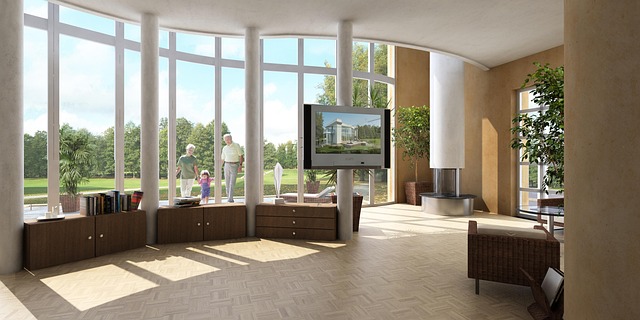
VR home tools now allow you to pull Mom in from Phoenix, shift couches around with her avatar, then place those same chairs into your real-life LA living room via the iPad camera. With this innovative interior design app, type ‘kid-safe’ and AI swaps glass tops for rounded ottomans, or speak ‘undo’ to remove the bot’s feng shui couch. When the space feels right, one click posts the vr model to Sketchfab, and your realtor pastes the iframe on Redfin so a buyer in Chicago can tour the place at 2 a.m.
AI Integration
-
Auto-fill code-compliant ceiling heights for Los Angeles County permits.
-
Swap sharp edges for soft forms upon entering “toddler proof.”
-
Balance IES lumen tiers for kitchen task lights, accent pendants, and living room ambient glow.
-
Dismiss any motion with ‘Hi VR, back up’ and the rig snaps back to your most recent hand-arranged configuration.
Say you despise the vr application’s initial concept. One voice prompt rewinds it all, no menu burrowing.
AR Overlays
Open the iPhone companion app, scan the vacant dining nook, and visualize how the chandelier dangles from the actual ceiling beam as you stroll. Lidar scans the real 9-foot height and upscales the fixture, ensuring it doesn’t appear dollhouse-sized. Take a pic, share it on Instagram, and let your followers approve or deny before you drill.
Collaborative Design
Click a link, your cousin in Tulsa flashes in as a blue ghost, hauls the digital couch and pulls it to the window. You maintain talk open through embedded voice chat, no Zoom window required. The app logs each move with a time stamp, so when someone asks “Who killed the breakfast bar?” the replay shows it was Greg at 8:14 p.m.
Once the crew signs off on the kitchen zone, you slap on a password lock so stray clicks don’t nudge counters after. VR blueprints now resemble collaborative Google Docs more than rigid plans.
Protecting Your Digital Home

A VR scan of your living room is a map of your life: couch size, kids’ toy pile, the safe behind the painting. Before you click ‘accept,’ open the privacy policy and CTRL+F the page for ‘share,’ ‘sell,’ or ‘third party.’ If the app reports your 3D mesh to a data broker, you’ll afterward get targeted ads for the very West Elm sectional you dropped in the corner.
Although one free tool, Planner 5D, sends scans to a company in Tel Aviv, its premium level allows opting out. Another, IKEA Studio, keeps the file on-device if you flip the ‘local save’ toggle buried in Settings > Storage. Five minutes of reading leads to five years of spam.
Cloud sounds convenient until you remember that house plans are priceless to thieves. See if the app provides “local project” or “device only.” RoomSketcher on Quest does; tap “save to headset” and the file resides in your 512 GB drive. If you already uploaded, most services allow you to retrieve it and then delete from their server.
Do it when you’re still in beta. After pub launch, many vendors lock the delete switch to fulfill “analytics” pledges.
Two-factor auth is free armor. Meta, Apple, and SketchUp all provide the option of SMS code or authenticator app. Select the app. SIM-swap scams in LA increased 80 percent last year. Save the backup codes in a password manager, not a Post-it.
When the VR version of your home resides beyond that second gate, an unauthorized password continues to block burglars.
After each session the headset leaves cache chunks: room scale, ceiling height, even Wi-Fi name. On Quest, connect to a PC, navigate to Android folder, then Oculus, then Temp and delete the .vrscan files. On Vive, execute “Clear Play Area Data” from the settings panel.
One friend neglected this step. His sold headset continued to contain a full floor plan that the new owner shared on Reddit. Erase for good, sell secure.
VR reduces change orders by 30 percent since you spot a clashing beam before the crew saws wood. It indicates where afternoon sun fries the den, so you can add an awning and reduce cooling expenses.
Use that same tech to test smart-lock views: stand in headset at door height and check if the Ring cam sees the mail slot or just bushes. Good design and good security now with one file.
Conclusion
Slip on a headset this evening, relocate a wall, change the siding, and check out what a Sooner sunset does to your new porch. VR transforms guesswork into gut-check, conserves gas money, and holds Oklahoma wind and hail outside until you’re certain. Back up the file, lock the account, then show your walk-through to the builder over coffee tomorrow. Are you ready to get started? Choose your room, take a free trial and design that first virtual wall today.
Frequently Asked Questions
Do I need a high-end PC to run VR home-design software?
Most vr applications run great on a mid-range Windows 10 PC with 16 GB of RAM and a GTX 1660 card, while cloud-streamed tools bypass the expensive GPU for enhanced virtual reality experiences.
Will VR design work on my Oklahoma City lot size?
Yes. Upload your survey or simply trace the OKC parcel map using our interior design app. Our tools scale automatically to any quarter-acre or 5-acre plot.
Can I see storm-shelter placement in VR before I build?
Yeah, for sure. Use a vr application to drop in a FEMA-rated safe room and do a walk around it to test garage or closet access.
How long does it take to mock up a 2,000 sq ft Tulsa ranch?
With pre-loaded templates in the interior design app, it takes some 45 minutes for project setup.
Is my floor-plan data stored safely in the cloud?
Trusted sites encrypt files end to end, ensuring security in app development, and allow you to delete them anytime while enabling two-factor authentication.
Which headset feels best for a full-day design session?
The Meta Quest 3 strikes a balance in weight and passthrough clarity. It includes a counterweight strap for all-day comfort.