

Smart LED bulbs allow you to dim, switch color, and schedule on-off times from any phone. They begin at about $8 a bulb at Home Depot and Lowe’s, and most screw into a normal E26 socket.
Utility rebates in CA take another $2 to $5 off the sticker. Below, we chart which bulbs work without a hub, how long they last, and tricks to slash your L.A. Edison bill.
Choosing Your Smart Bulbs

Get the smart bulb to the socket, the app, and your eyes.
1. Brightness
Start at the box: 800 lumens replaces the old 60 watt glow in a bedside lamp. 1,100 lumens manages a kitchen ceiling. Flip the app slider to 100 percent; some bulbs top out at 80 percent to keep cool, so you lose punch.
Hold your phone light meter app about 2 feet from the shade. A good smart LED casts 600 lux at desk level. Forget ’60 watt equivalent’ stickers; they are guessing. Check the lumen numbers.
2. Color
RGBW chips provide you with teal party mode and clean white for bills. RGBWW incorporates a second warm diode so candle mode looks orange not pink.
Scan the tiny Kelvin chart on the back: 2,200 K feels like a bar in winter, while 6,500 K feels like an L.A. Noon. In the store demo, swipe blue to red; if the blue looks grey, the diode is weak.
Gradient bulbs slice the stem so one glass globe can bleed sunset on one half and ocean on the other.
3. Connectivity
Wi-Fi bulbs connect to your router directly, with no bridge, but each additional bulb consumes 2.4 GHz airtime. Open the router app and tally clients first.
Zigbee ones require a $30 hub but still function if Comcast dies. Every bulb repeats the signal so the mesh gets stronger. Bluetooth pairs in seconds but drops past the hallway, which is great for a dorm but terrible for a house.
New Matter boxes, such as Linkind and Nanoleaf, chat in every language, including Siri, Alexa, and SmartThings, so you won’t have to repurchase in a couple of years.
4. App Control
Tap the icon: off-to-on should blink in under a second. Two-second lag feels like dial-up. Verify for scenes called “Focus,” “Movie,” and “Away.
Away switches lighting on at 7 p.m. Even when you’re in Big Bear. Grouping is important—kitchen pendants should dim as a group, not individually. Switch between cloud and local mode. Local still works when the router’s down.
5. Socket Type
US lamps and cans still mostly roll E26. Read the brass base: if it says E26, it screws in; if it says E27, it still screws in but wobbles.
A19 glass remains in a typical shade, while A21 sticks out like a torch. Outdoor sconces require a damp label, and sub-zero-rated LEDs sizzle off at 32 °F. Old porcelain fixtures say 60 W max.
Your 9 W LED is cool, but check the label so you don’t fight with the landlord.
Price cheat-sheet
- $8–$12: white-only Wi-Fi, 800 lumens, no hub, one-year app updates
- $15–$22: RGB Wi-Fi, 60 lumens per watt, schedules, works with Alexa and Google
- $25–$35: Zigbee or Thread, 90 CRI, 25,000 hours, full-spectrum white
- $40–$55: Matter-ready, gradient glass, 1,100 lumens, Apple HomeKit built in
How Smart Bulbs Connect
Smart bulbs need three things: power, a wireless home, and a name. Replace your old bulb, switch the wall switch, and watch your new one flash. Open its app, tap the blink pattern, and type the 2.4 GHz Wi-Fi password you scribbled on a Post-it on the router. Rename “A19_C7_B4” to “Bedroom Left” while you still remember which lamp you just did. Future you will thank present you at 2am.
Devices that can talk to the bulb include:
- iPhone, Android phone, or iPad
- Amazon Echo, Google Nest, or Apple HomePod mini
- Samsung SmartThings, Philips Hue Bridge, Aeotec, Hubitat, or Echo Show 8
- Any router that spills 2.4 GHz Wi-Fi
- A tablet with Bluetooth 4.2 or newer
WiFi
Most bulbs scream for 2.4 GHz during setup. They hear 5 GHz and moan and shut up. Regard the router to 30 ft from your first bulb. Drywall makes for quick signal drops.
After pairing, login to the router and assign each bulb a static IP so it doesn’t wake up with a new address and disappear from the app. Count your fleet: thirty Wi-Fi bulbs on a $79 basic router can choke Netflix. If streams stall, upgrade to a dual-band gigabit box before you add more bulbs.
Bluetooth
Pair in the same room. One interior wall reduces range from 98 feet to approximately 15 feet. Open phone settings, scan, and tap the bulb when it pops up—no password, no drama.
There’s only one phone that owns the bulb at a time, so housemates swap control by swapping the device. Dorms, rentals, and basement studios love Bluetooth bulbs because you never touch the landlord’s router.
Hubs
A hub connects your bulbs to the cloud and keeps local traffic off Wi-Fi.
|
Hub |
Max bulbs |
Key tricks |
Pros |
Cons |
|---|---|---|---|---|
|
Philips Hue Bridge |
50 |
Zigbee, Matter ready |
Rock-solid, wide dim range |
$60 bridge sold separate |
|
Samsung SmartThings |
200 |
Zigbee + Z-Wave + Wi-Fi |
One app for every brand |
Steeper learning curve |
|
Echo Show 8 (gen 2) |
30 |
Built-in Alexa voice |
Speaker + screen combo |
Needs Amazon account |
Plug the hub into the router with ethernet. Wi-Fi backhaul adds half-second lag you notice flipping lights with a wall switch. Check the device ceiling before you go wild. Hue taps out at fifty. SmartThings sails past two hundred.
Integrating Your Smart Lighting
With smart lighting options, a single room or the entire house can transform using smart bulbs to suit mood, activity, or security requirements without a blink.
-
Pop in the bulbs and fire up the brand app. Follow the on-screen guide to join Wi-Fi or Zigbee.
-
Create rooms—kitchen, bedroom—to group bulbs for faster voice commands.
-
Get a ‘Goodnight’ scene with all smart lights dimmed to 5 percent at once.
-
Try automations out during the day. You’ll catch mistakes before visitors are present!
-
Rename each bulb inside its app. Short words like “Desk” or “Porch” cut mistakes.
-
Complement with motion sensors in halls and baths so lights turn on at 20 percent for safe late-night jaunts.
-
Connect scenes with thermostats. When Nest goes below 68 °F, bulbs transition from cool white to warm white for coziness.
-
Save energy by combining schedules with occupancy sensors. Unused rooms remain off without additional taps.
Voice Assistants
Say “Alexa, find devices” after install. She discovers Wi-Fi and Zigbee bulbs in 45 seconds. When they are listed, rename them in the Alexa app. Easy tags like “Desk” prevent stumbled orders.
Google Home owners select Routines and customize “Hey Google, movie time” to dim living-room bulbs to 15 percent and change TV input. Apple HomeKit owners scan the bulb’s QR code inside the Home app so Siri can respond “Turn off bedroom.
Home Automation
Connect smart bulbs to motion sensors so bathroom light turns on at 20% for night trips.
Hard-wired smart switches maintain power, and bulbs recall their previous state even after a wall flick.
Couple bulbs with Ecobee or Nest. When the temperature drops, lights go warm white for coziness.
IFTTT can blink porch RGB lights blue when Ring detects motion. It’s a simple notification, with no additional alarms.
Scheduling
Set wake-up routine: bedroom bulb fades from 0 percent to 50 percent warm white over 10 minutes at 7 a.m., easing eyes open.
Away mode does random on/off from 6 pm to 11 pm. Neighbors think you’re home.
Sleep schedule shifts color to 2200 K candle level 30 minutes before bed for melatonin boost.
Tap vacation override in the app. All timers stop when you’re home early.
Smart Lighting for Your Home
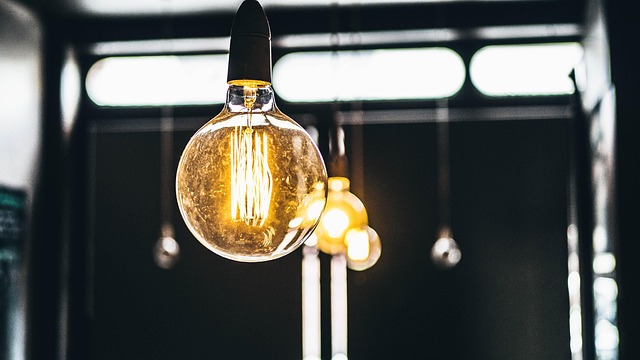
Sketch the floor plan and write down the fixture type along with existing wattage. Then, replace your everyday light bulbs in the living room and kitchen with smart LED bulbs to achieve lower power draw, which will be reflected on next month’s LADWP bill. One bare switch should be left alone; visitors despise searching for an app. Chuck those vintage incandescents in a shoe box in the garage marked ‘hazardous waste.’ If a $12 Wi-Fi bulb expires at 2 a.m., you can still see.
Living Room
Pop a full-color direct-connect bulb in the main lamp and the Alexa cue “Movie red” drops the brightness to 30 percent and kills the blue tint so the screen pops. A19 1,100 lm bulbs in the ceiling reach 300 lux on the coffee table glare-free, and a $25 light strip behind the set reduces eye strain when you binge Netflix post-work.
Cluster the lamp, ceiling, and strip all under “Living Room” and one voice command dims the lot. There is no more pacing the circuit to twist four knobs.
Kitchen
NICE 4,000 K white under counter displays avocado bruises before you slice, and the BR30 floods in the recessed cans cast a wide 110° beam so you don’t cut in your own shadow. Motion-activated LED strips under the cabinets flip on when you enter with bags of groceries.
The automation is housed in the bulb app, no separate hub. Does your ceiling have 8 or more cans? Replace the wall switch, not every bulb. One $30 smart switch trumps eight $15 bulbs and still schedules off at midnight.
Bedroom
A tunable white bulb that drifts from 2,200 K candle to 6,000 K daylight allows you to read a paperback at noon and wind down at night without changing fixtures. Maintain night levels below 500 lm. The warm end avoids the blue spike that signals your brain to stay awake.
Schedule a 30-minute fade so the light is off before you’re asleep — no cold dash to the wall. If the router is in the living room, a little Bluetooth bulb on the nightstand still chats with your phone without having to worry about WiFi hiccups.
Outdoors
Get bulbs labeled “wet rated” too. The package lists –4 °F to 104 °F so Valley nights won’t brick the radio. A 2,500 lm LED flood on the garage partners with a motion sensor and scares off porch pirates before they even get to the steps.
Tuck fixtures under eaves. Even outdoor bulbs live longer when rain skims the roof instead of pounding the socket.
The Hidden Costs
The sticker price of a smart bulb is just the first line on the invoice. One white bulb goes for $7 to $15, while the color ones hit $60, and if your bulb requires a hub you’ve just tacked an additional $30 to $60 to your cart. Push that hub cost out across all the bulbs in the house and a six-bulb starter set climbs to about $10 a unit before you twisted one in.
Cheap no-name bulbs often croak in two or three, while name brands like Philips Hue press beyond ten. Firmware chores consume time as well; each bulb requires a five-minute silent update every few months, and a home with 20 bulbs consumes almost two hours of your year.
Then there is the trickle of standby power: 0.2 to 0.5 watts per bulb, about $1.30 to $1.50 each annually, a dime more than a plain LED. Over a decade that gap can buy lunch, not a car, but it’s real money.
Security Risks
Bots scan for “123456” 24/7, so fire up the app and change the default password on day one. Update firmware the same week it ships. Patches close Wi-Fi holes that let strangers flip your lights or worse.
Leave bulbs on the guest network. If one gets hacked, it can’t roam into laptops or phones. Shut off remote access if you never leave the house. Any open port is a door you don’t need.
Data Privacy
|
Brand |
Voice Clip Storage |
Analytics Toggle |
Local Only Mode |
|---|---|---|---|
|
Philips Hue |
90 days, opt-in |
Yes |
HomeKit/Thread |
|
LIFX |
Cloud-only, no fixed delete |
Yes |
No |
|
GE Cync |
2 years, auto-delete |
Yes |
Limited |
|
Wyze |
Indefinite, share with partners |
Buried in menu |
No |
Flip the “usage analytics” switch off to halt over phone-home traffic. Select bulbs that shout HomeKit or Thread if you need routines to remain within your walls.
When you swap brands, erase the old account. Residual data lingers on servers well past the light bulb’s demise.
Long-Term Support
Big names—Philips, GE, LIFX—have teams still patching 5-year-old bulbs. Just scan app-store reviews for the latest firmware date. Dead brands freeze at 2021 and never inch again.
Startups that don’t have a Matter roadmap can disappear overnight and brick your entire lighting scheme. If its app allows, store a copy of today’s firmware so you can revert when a revision mutes your most-loved hue.
Are Smart Bulbs Worth It?
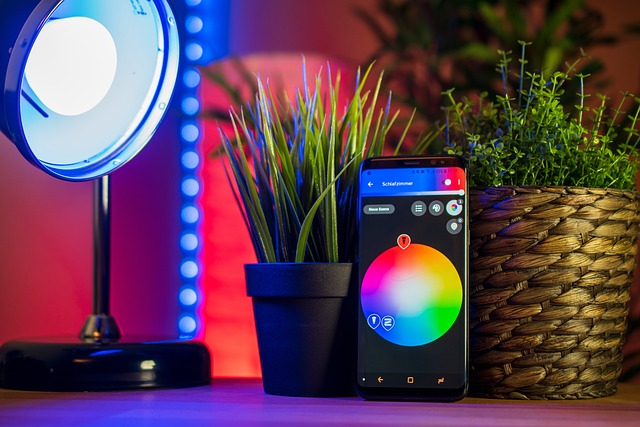
A 9 W smart LED uses less energy than a 60 W incandescent bulb on the power bill. Run it three hours a night and you shave, say, 84 kWh a year. At the L.A. Average of 18 cents per kWh, that is $15 saved per socket.
Take off the $8 that you overpaid for the Wi-Fi chip and you still save $7 annually per bulb. Replace six lamps in a small apartment and you have a round trip to San Diego in gas money every year for the next ten years.
Convenience adds up quick. Voice dimming and phone taps eliminate the nightly walk-around to switches. In a two-bed condo near USC, that shaved thirty minutes a week off my life, primarily from not trekking back to the entry light after I was already in bed.
Include a goodnight routine that drops every bulb to 5% and then off, and you bypass the pre-sleep checklist. Renters love it because not a bit of wiring is touched; you just swap out the bulb and leave the old ones in the closet when you move.
Colors are the gimmick. Sixteen million hues and tunable white from candle 2200 K to noon 6500 K means one $18 bulb can be a dawn alarm, work light, and neon backdrop for game night.
I arranged a slow blue-green fade for Lakers watch parties. Friends assumed I’d installed strips behind the TV. Plain white bulbs can’t play that game and a Philips Hue gradient light strip kit costs $200 or more, plus a hub.
That catch pops up when the router hiccups or the cloud goes dark. Bulbs fall off, scenes malfunction, and you’re the tech support. They sip 0.3 W when “off,” so purists count them as vampire loads.
In California, that phantom draw contributes an extra 40 cents a year per bulb, less than a drop of coffee. If you hate app updates or juggling logins, stick to dumb LEDs and a $25 smart wall switch. You lose the colors but still have voice control and pay zero standby watts.
Conclusion
You replace a boring bulb with one that dims from your sofa. You’ve got the porch light to welcome you at six. You save a dollar on the power bill every month. These little victories add up quickly. Choose bulbs that match your lamp, your Wi-Fi, your life. Avoid the shiny specs you’ll never use. Invest now, chuckle later when your electric bill takes a dive. Ready to flip the switch? Snag a starter bulb tonight and turn it on.
Frequently Asked Questions
Do smart bulbs raise my LADWP bill?
Smart LED bulbs consume 80% less energy than traditional 60W incandescents, making them an excellent choice for smart home lighting. A bustling L.A. home with six smart bulbs on for 8 hours a night adds merely about $1.20 a month on Tier 1 rates.
Which smart bulbs work with Alexa in a 1940s L.A. bungalow?
Any smart LED bulb marketed with ‘no hub’ connects directly to Echo. If your plaster walls block 2.4 GHz, opt for Thread models like Nanoleaf Essentials to reduce dropouts.
Can I still flip the wall switch and keep voice control?
Yes, keep the switch on for your smart bulb. Pop on a $10 magnetic toggle guard so house guests don’t kill power and unplug the smart lights.
Do smart bulbs survive Valley heat waves?
Top brands are 104 °F. Install outdoor fixtures in the shade. Indoor A/C keeps them cool and extends life past the 25,000-hour promise.
Will they work when LADWP rolls power?
Bulbs require live juice to function, and during outages, they become dark. A tiny UPS on your router keeps remote control alive, ensuring access to your smart home lighting app.
Are rebates available for L.A. renters?
LADWP offers an instant $2 to $4 discount at checkout for Energy Star smart LED bulbs, so check the weekly list at ladwp.com before heading to Home Depot for smart lighting options.