

A separate guest network allows guests to jump on Wi-Fi without messing with your primary equipment. It provides them a new subnet, a new password, and a firewall rule that blocks printers, file shares, and your den’s smart TV.
Most US routers include it in two taps and label it ‘Guest.’ The brief walkthrough below demonstrates how to activate it, establish time restrictions, and maintain the speed you pay for.
Why Your Ohana Needs One
Separating guest Wi-Fi keeps your cousin’s cracked-screen Android off your smart fridge, your teen’s gaming rig, and the tax files on the home server. One bad tap on a phony ‘Disney+’ pop-up can’t slither through the house if the guest is locked in their own driveway.
Real-world risks you stop with a guest SSID include identity theft via key-logged passwords, botnets that recruit your TV to attack banks, Ring cams hijacked for live swatting streams, ISP warning letters after someone torrents “Fast X,” and ransomware that rewrites every photo on the NAS.
Digital Security
Separating guest traffic on its own wi-fi name prevents access to the router admin page and all devices wired behind it. Most routers come with a one-click “Guest Network” toggle that turns on VLAN-style separation.
Once on, your Hue bulbs and MyQ garage opener reside in a silent domain as Auntie’s iPhone can only access the internet. Enable WPA3 on the guest SSID and any snoop parked out front with a packet sniffer encounters AES-256 encryption rather than the antiquated WPA2 handshake still operating on a ton of legacy equipment.
Guest Privacy
Visitors need to hear their late-night TikTok scroll isn’t stamped along with your family’s cloud backups. With a separate guest Wi-Fi network, shared folders, printers, and security cameras are hidden by default.
Windows displays an empty workgroup and AirPrint discovers nothing. Giving someone a password that begins with “Aloha2024!” is more secure for them and more convenient for you. There’s no need for them to request it at the next BBQ and you can change it in thirty seconds once they exit.
Network Performance
Leave the 5 GHz band for your personal 4K Netflix queue and driveway visitors on 2.4 GHz limited to 25 Mbps. Zoom calls stay crisp, Xbox pings stay low, and no one whines that the ‘internet is broken.’
Most ASUS, Netgear, or Eero units have you drag a slider in the app — set it and forget it until graduation season when the entire block comes out.
Legal Protection
If a visitor downloads the new Kendrick leak, the DMCA strike hits the guest SSID MAC address, not your primary account. Screenshot the text you sent with the password and the time stamp.
It looks like due diligence if a notice becomes a letter from Verizon’s legal team. California courts have accepted router logs as evidence that the homeowner operated a separate network, moving culpability to the specific downloader.
The Aloha-Proof Guest Network
Aloha-Proof” means the setup feels like handing someone a cold drink: quick, kind, and drama-free. It protects your primary LAN as visitors roam, use the guest Wi-Fi network, or show off on Instagram. The five boxes it has to tick are below.
|
Must-Have Feature |
What It Does |
Real-Life Payoff |
|---|---|---|
|
Total Separation |
Own SSID, subnet, no LAN peeking |
Ransomware on Uncle’s iPad stays on 192.168.2.x |
|
Easy access |
Cool name and QR code |
No “Is that capital O, or zero?” at 11pm |
|
Bandwidth Control |
10 Mbps cap per device |
Your Zoom still crisp whereas four teens TikTok. Liability Shield: Blocks torrent ports, logs odd traffic. ISP love letter never shows up |
|
Device Isolation |
Client isolation ON |
Guest can’t AirPlay Rick Roll to your Samsung Frame |
1. Total Separation
Choose a name that doesn’t give away you live there—avoid something like “Maui-Home-5G”. So you type 192.168.2.1 into your browser, create Aloha-Guest, and give it its own password stored only in the router, not your keychain.
Deselect “Allow guests to access local network resources.” That one click squashes printer pop-ups and NAS probes. Finally, tweak the DHCP pool to 192.168.2.x so the guest VLAN cruises a different avenue than your 192.168.1.x family wheels.
2. Effortless Access
Spell the SSID like you’re shouting across Ala Moana Beach: “Aloha-Guest” works. Wayne Gretzky about three decades ago: Most Asus, TP-Link, and Eero menus conceal a QR maker.
One tap saves a PNG you can text before arrival. Print it on cardstock and lean it by the pineapple on the counter. Visitors scan and browse without needing to request once more.
3. Bandwidth Control
Open QoS, push up the guest slider to 10 Mbps down and 2 Mbps up, which is perfect for 1080p FaceTime but not for 4K game downloads. At 200 Mbps, four capped devices still leave you with 160 Mbps.
Make the rule sleep from 2 a.m. To 8 a.m. Night owls have maximum speed when no one is looking.
4. Liability Shield
Flip on “Block p2p ports” and “Enable SPI firewall for guest network.” Activate email notifications to ensure that your guest wifi network remains secure. The router will text you if someone on channel 6 ignites Tor, helping to mitigate potential security risks.
5 reasons to host on AIRBNB: Choose the check-out date and the SSID for the guest wifi automatically disappears, sparing you a trip to reset passwords and ensuring a secure internet connection for your guests.
5. Device Isolation
Look for “Client Isolation” or “AP Isolation” depending on make. Guest phones detect just the gateway. They cannot cast Spotify on your Sonos or spam the office Epson with beach pics.
Stream still loads, banks still open—just no neighbor peeking.
: set it once, share aloha, forget it.
Router Setup Guide
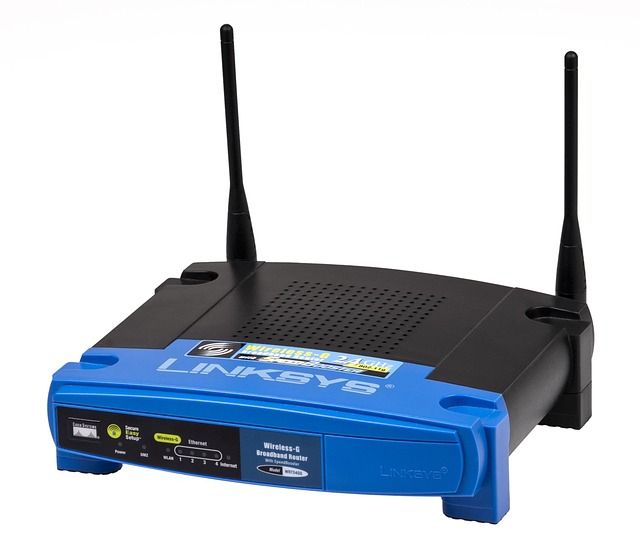
A guest wifi network keeps prying visitors off your main files while providing a secure internet connection for your guests. In non-tech speak, pick up a laptop, an ethernet cord, the sticker on the router, and the ISP sheet you crammed in a drawer. Five quiet minutes at 192.168.1.1 (or the phone app) is all it takes; no brand loyalty needed. Tips below suit Aircove, NETGEAR, Tenda, and the like.
Access Your Router
Enter 192.168.1.1 or 192.168.0.1 in any browser bar. If both don’t load, turn the router over and search for “Router Login.” A password manager stores the admin pair so you don’t stick it to the desk.
First thing, change the factory password. Guest features thrown wide a little door you’ll want bolted.
Find Guest Settings
Click, ‘Wireless’, ‘Guest Network’. If you don’t see the tab, open “Advanced” or type “guest” in the little search box up top.
Get a phone pic of their menu. Your future self will thank you when friends ask why their laptop drops every ten minutes.
Configure The Network
Call the guest SSID ‘Lobby24’ or ‘PoolWiFi’ or whatever makes your street number invisible. Choose WPA3. If the drop-down lists only WPA2, skip ‘Open.’
Use something like ‘7Cat!88Tree99’ — a 12-character passphrase that’s easy to yell across the kitchen and tough to crack. Keep 5 GHz on channels 36-48 or 149-165, 40 MHz wide.
On 2.4 GHz, stay on 1, 6 or 11 so baby monitors don’t battle you.
Save And Reboot
Tap ‘Apply,’ see the LED flash off and on for a minute. Connect to the ‘new network’ with your phone. If it’s loading CNN, distribute the password!
Open Notes on your phone and title an entry ‘Guest Network 2024’ with SSID, key, and channel you chose. Future adjustments will take half a minute, rather than half an hour.
Securing Your Guest Access
A guest SSID is just half the work. If the same subnet sits on both sides of the router, traffic squirts through. Set two VLANs: office on 10.0.10.0, guests on 192.168.99.0, and the switch eliminates cross-talk. Open firmware, stale passwords, or a 50 mbps torrent can unmake the wall.
These four habits take less than two minutes a month and keep the gate shut.
Strong Passwords
Change the guest key every season or immediately following the Super-Bowl bash. Something like “Aloha-2024-Surf!” lodges in the memory but doesn’t break any charts. Never share your primary wifi password since that hands guests the very same hash that protects your NAS.
Dodge sequences such as “12345678” or the hotel standard “Guest1234” since bot scripts munch through those in seconds.
Update Firmware
Enable auto-update so the patch arrives at 3 a.m. Linksys, Netgear, and Asus all bury the toggle under Administration → Firmware. Once a season, look at the status page and match the build number with the vendor site.
Old code remains the number one method a bored teen jumps from the guest VLAN into your cams. If the router is EOL, flash OpenWRT or spend $80 on a new box for affordable protection.
Limit Bandwidth
Give guests 5 Mbps up and 15 Mbps down. That takes care of TikTok without squashing your cloud backup. In QoS, drag the guest SSID to the lowest tier and bump your work MacBook to ‘Voice.’
About securing your guest access, check the month graph. If the peak is only 2 Mbps, turn the cap down and take back the pipe. One client streaming 4K can easily still nudge 3 GB an hour, so keep the leash tight.
Disable Sharing
Deselect “Allow guests to access local resources” on each brand menu—it’s right next to the chicken icon. Disable UPnP on the guest VLAN; otherwise, the Xbox has open ports.
Do a quick scan from a laptop on the guest Wi-Fi. If you see the printer or the NAS, something’s leaking. DNS filtering on the guest side blocks malware before it phones home.
Pair it with the VLAN and you’ve built a plastic tunnel straight to the web with no pit stops.
The Digital Pono Principle
In Hawaiian, pono means doing right by everyone. A separate guest Wi-Fi network keeps that spirit alive, allowing guests to surf while your valuable devices stay safe, ensuring convenience without awkwardness.
|
Payoff |
What it gives |
|---|---|
|
Smooth guest experience |
One QR scan and they’re online; no dead air. |
|
Owner peace |
Your cameras, PCs, and bulbs stay on a locked lane. |
|
Future-proof setup |
WPA3-ready gear lets you add SSIDs or move homes later. |
Guest Experience
A printed QR taped near the light switch gets visitors on in one snap, no long password talk. Their Netflix loads quickly as the router throttles each guest to 25 Mbps, so the teens in the lanai can’t monopolize the whole pipe.
The splash page welcomes them with a brief message—quiet hours 9 p.m. To 7 a.m., appreciate your remaining—so you bypass the diatribe at check-in. One host in Kaimuki experienced “How do I get online?” texts drop to zero after adding the code.
Owner Peace
Your security cam feed, NAS tax files and smart bulbs remain on the primary SSID guests never glimpse. When the last car pulls out of the driveway, toggle the switch in the Asus or TP-Link app and the guest radio shuts off.
If the ISP sends a letter warning of a rogue movie download, the logs indicate the MAC associated with the guest network, not your laptop. One Maui owner turned off the guest net from LAX during boarding, came home, and discovered the thermostat still running her schedule.
Future-Proofing
New phones come requesting WPA3 already. Netgear’s $120 ones sold at Best Buy Hawaii secure that way currently and nonetheless permit legacy tablets on WPA2.
Save a special guest SSID called “IOT-5G” for when the fridge requires its own lane next year. Write the settings in a note on your phone: VLAN ID, password, and DHCP range. Hand the list over to the next owner or your geeky nephew when you trade up.
That little post-it buddha transforms a trade from a three-hour scavenger hunt into a ten-minute to-do.
Common Setup Mistakes
Most people just fire up the new router, check ‘guest SSID’, and wander away. That fast click leaves four holes open more times than not.
- Leaving guest wifi open—no password at all.
- Using the primary network key again since it is convenient to remember.
- Forgetting firmware updates; the box still runs 2019 code.
- Missing client isolation. Guests can now nudge printers, TVs, and phones.
An open guest SSID is the electronic equivalent of leaving the front door wide open. Anyone in the parking lot jumps on, does a port scan, and sees all the shared drives. Recycling the house password sounds secure until a guest stores it in a phone that subsequently gets nabbed. The burglar has the keys to the entire LAN.
Firmware sits silent, but bugs such as the 2021 WPA3 flaw allow a child with a $25 thumb tool to crash the radio chip. Client isolation sounds geeky, but one click prevents the realtor’s laptop from talking to the coffee shop’s POS device.
Forget bandwidth caps and a single 4K stream drags down 25 Mbps. Two guests start Netflix, your Zoom drops and the boss thinks you froze on purpose. A quick ceiling check helps: if the access point tops out at 100 devices and you already have 80 staff phones on the main network, adding fifty conference badges breaks the math.
Same-box, same-code roll-outs seem neat until a crook discovers a single weakness. Then he owns every site from LA to Denver at no additional effort. VLANs fix that. Assign the guest SSID to VLAN 20, configure the firewall to deny VLAN 20 to LAN, and you just created an inexpensive moat.
Web filters on that same VLAN can block torrent sites so the store doesn’t get a Comcast warning. IoT toys crave guest nets since they smell easy passwords. This is a bad idea. A smart pet feeder on guest WiFi still attempts to phone China every minute if it gets compromised.
Isolation keeps it from spreading but it mops up airtime. Provide cameras and thermostats with their own VLAN instead, one with no web access. A router swap may not solve drops. Old cable runs, PoE injectors maxed at 100 mbps, or a single AP in a 3-story brick building all limit speed.
Map the square feet, count seats, then add a second AP for every 60 active seats. Wire each back to the switch with Cat-6, not mesh repeaters. Run tonight’s audit: read SSID names out loud to be sure “CorpSecure” and “CorpGuest” look different, verify that guest has its own 16-char passphrase, and confirm isolation is enabled.
If any box says firmware 1.0.x, update before coffee tomorrow.
Conclusion
You’ve got the lay of the land. About: separate guest network A guest network keeps your main wifi safe as friends post sunset shots from your lanai. Just plug in the router, flip the guest switch, set a simple password and you’re done. See who jumps on once a week and boot the unknown devices. If the signal drops, reset and bring the box closer to the living room. These little measures save you a late-night call to the cable guy. Go crack open the settings now, create “Aloha-Guest,” and give the key to your next visitor.
Frequently Asked Questions
What does a separate guest network actually do?
It establishes a separate guest wifi network on your router. Friends can connect to it, not your main network, ensuring bank files and smart devices remain secure.
Will my speed drop if guests stream Netflix?
A little, truly. Most new routers auto-split bandwidth, ensuring you still get enough for Zoom and Disney+ while using a guest wifi network.
Do I need new gear for a guest network?
Nope. So do just about every router sold at Target or Best Buy Hawai‘i since 2018, including those with guest wifi network capabilities. A quick settings click switches it on.
How long should I leave the guest password active?
Change the guest wifi network after every lu‘au or Airbnb visit. New keys ensure old devices can’t reconnect, protecting your data cap.
Is a guest network enough for home security?
It’s step one. Add WPA3, router firmware updates, and a strong password for your guest wifi network for real ‘digital pono’ protection.